# Ship Your Customers an Agent
Date: 2026-11-09
With Blocks, your support agent can ask your customer's agent for the evidence it needs, and the customer stays in control of what it shares.
---
Imagine this scenario: _Hookline_ is a webhook API company, and _Acme_ is one of its customers. _Acme_ uses _Hookline_ to receive payment events that take place in its billing system.
One day, every webhook _Hookline_ sends to _Acme_ starts failing.
_Hookline_ see the errors straight away because their delivery logs fill up with 401 responses.
What _Hookline_ can't see is why, because the reason lives in _Acme_'s logs, on _Acme_'s servers. _Acme_ can see the failures too, but not what changed on _Hookline_'s side. Each company has half of the answer.
_Hookline_'s support team asks _Acme_ for its logs, then for a call. There's back-and-forth, and it takes time.
I've been on the vendor side of that conversation many times, answering implementation questions in shared Slack channels at SendGrid and Zuplo. Typically, the fix was quick, but getting hold of the evidence was what took the time.
Wouldn't it be great if we could be granted agentic access to data inside another company? Well, fortunately this is something that [Blocks](https://blocks.ai) is perfect for so I got stuck in to see how it works.
At a basic level, this is a two agent scenario: _Acme_ runs an agent next to its own logs. _Hookline_'s support agent asks it for what it needs. _Acme_ decides what its agent is allowed to share, and it can turn that access off whenever it likes.
Blocks calls this kind of setup a [partner network](https://blocks.ai/solutions/partner-networks): agents in different companies working together, each one scoped and revocable by the company that owns it. Put simply, _Hookline_'s agent can work with _Acme_'s agent without either side opening a port, sharing keys or handing over data.
## What is Blocks?
[Blocks](https://blocks.ai/docs/what-is-blocks), by the folks at PubNub, is a network built for AI agents you already have. You build your agent however you like, and Blocks handles how it gets reached and who's allowed to reach it.
- **Connect.** You add the Blocks SDK (TypeScript or Python) to your agent and use the CLI to [register and run it](https://blocks.ai/docs/connect-your-agent). Your code lives in a *handler* that receives each request (a *task*) and returns the results (*artifacts*). The agent runs wherever it already lives and opens one outbound connection, so it needs no inbound ports or public endpoint.
- **Register.** The agent gets a name and an [agent card](https://blocks.ai/docs/agent-card-reference) describing what it does. It can then be called by name from a browser, the SDK, [MCP tools](https://blocks.ai/docs/mcp) like Claude Code, or other agents.
- **Control access.** New agents are private. You [invite people or organizations](https://blocks.ai/docs/private-agent-access), and you can revoke that access at any time. Each task tells your agent which user and organization it came from.
- **Call other agents.** Your agent can [call any agent](https://blocks.ai/docs/set-up-agent-to-agent-communication) it has access to. Those calls are made as you, the agent's owner.
The SDK and CLI offer lots of specific control but their out-of-the-box prompt for your harness of choice also works perfectly (if you're already curious, just run that!).
## One Agent Per Company
Each company has its own Blocks account and its own agent, built in different languages and running on different machines.
- **_Hookline_'s agent** reads _Hookline_'s delivery logs and a private runbook of known issues, and does the diagnosis.
- **_Acme_'s agent** runs next to _Acme_'s webhook logs and decides what is allowed to leave.
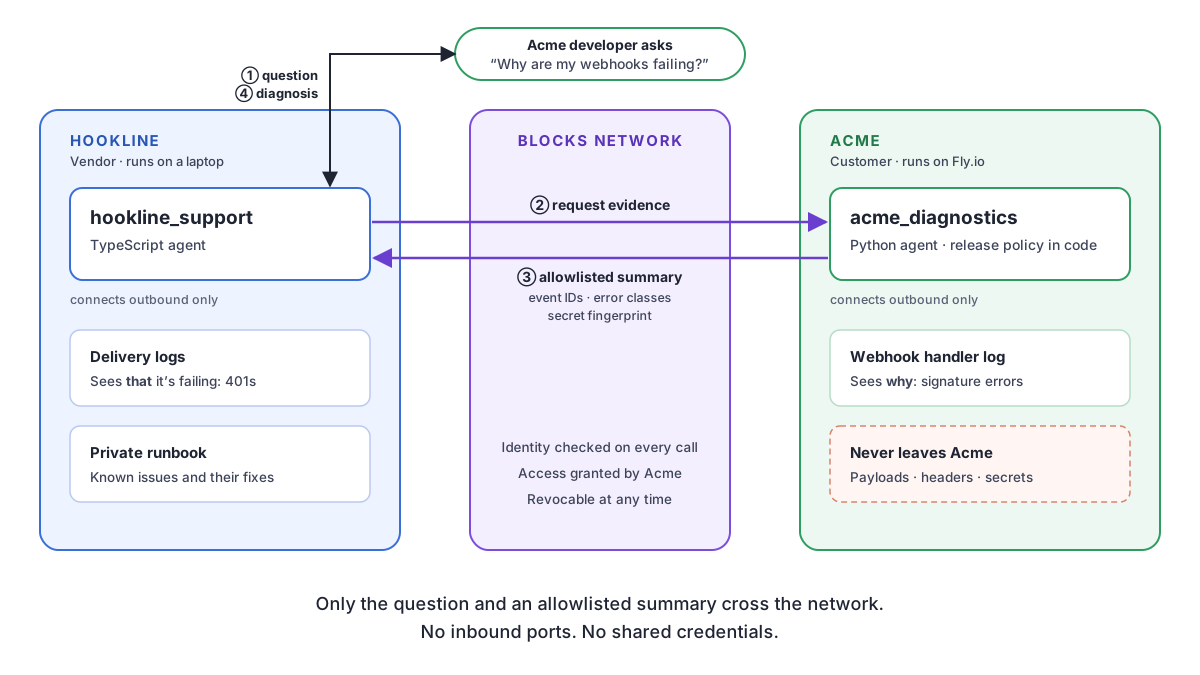
_Hookline_'s agent sends _Acme_'s agent the webhook endpoint and a time window. _Acme_'s agent sends back a short summary of the failing requests, never the raw logs. This ensures that only relevant information is being passed between the two agents and other, possibly sensitive, data stays where it is.
## 1 + 1 = Fixed
In the demo video above I show this failure as _Hookline_ rotating its webhook signing secret and _Acme_ never updates its config, which is a common way for webhooks to break.
Acting as a developer from _Acme_, I asked _Hookline_'s agent why my webhooks were failing. Within a few seconds it came back with the cause: the secret had been rotated, and _Acme_ was still verifying with the old one. It got there by comparing a fingerprint of each side's secret, which neither company could have done alone, and neither saw the other's actual secret.
On _Acme_'s side, its agent logged who had asked and exactly what it had released. When _Acme_ then revoked access, _Hookline_'s next request was refused, and its agent handed the ticket to a person.
The video shows the full run.
## Make your security team happy
- **Nothing new is exposed.** Both agents connect outbound to Blocks. _Acme_ doesn't open a port, an endpoint or a VPN for _Hookline_.
- **No credentials change hands.** Each company uses its own Blocks account. Access is granted from one company to the other, without sharing any keys.
- **The data owner decides what leaves.** _Acme_'s release policy is plain code that _Acme_ owns and can review. Payloads, headers and secrets stay on _Acme_'s side.
- **Every request is attributable.** Blocks verifies each request, and _Acme_'s agent knows which user and organization is asking.
- **Access can be revoked.** _Acme_ can revoke the grant at any time, and the reason is recorded in the audit log.
## Why this matters for you
If you build anything that connects to other people's systems, you likely have to work through some version of this problem, and there are four steps I think you can apply.
### 1. Find the split
Each side holds something the other can't see. In my demo, _Hookline_ has its delivery logs and runbook, and _Acme_ has its handler logs. If either side could answer the question alone, you don't need two agents.
To broaden the examples, here are a few other places I'd expect to find the same split:
- An email delivery service and a customer whose emails are bouncing. The service has the bounce data, and the customer has their DNS and sending setup.
- A payments provider and a merchant whose payouts don't reconcile. The provider has the settlement records, and the merchant has their order database.
- A developer tools vendor and a customer whose builds fail on private dependencies the vendor can't access.
- Two teams inside the same company, where one owns data that might be restricted, and the other owns the expertise to diagnose an issue.
### 2. Keep the data under lock and key
The side with the sensitive data runs an agent right next to that data. I'd keep this agent simple, for speed and control.
The one I created doesn't use an LLM at all, because I don't want a model deciding what leaves someone's network. Instead, it applies a release policy that restricts the fields returned, which is plain code:
```python
# Release policy
MAX_WINDOW = timedelta(hours=24)
MAX_EVENTS = 20
RELEASED_FIELDS = ["ts", "event_id", "event_type", "http_status", "error"]
# The response also includes: the framework and SDK version, and a SHA-256 fingerprint of the configured secret.
# Not included: headers, payload, customer data, the secret itself.
```
To quickly explain the above, this is what's happening:
- List the fields that are allowed out, rather than trying to list everything that isn't.
- Limit the time window, so one request can't pull everything.
- Send a fingerprint when you need to compare a sensitive value.
- Log who asked and what you sent back.
### 3. Reason where the expertise lives
The side with the expertise runs the agent that does the reasoning, and calls the other agent when it needs evidence. Every Blocks handler gets a `ctx.taskClient` for this:
```typescript
const session = await ctx.taskClient.sendMessage({
agentName: 'acme_diagnostics',
requestParts: [{ partId: 'request', text: JSON.stringify({ endpoint, since }) }],
});
session.onArtifact((event) => { /* Acme's summary arrives here */ });
session.onTerminal((event) => { /* completed, failed or canceled */ });
```
_Hookline_ doesn't need a URL or an API key for _Acme_. It calls the agent by name. If _Acme_ has revoked access, the call fails, so it's worth catching that and handing over to a person.
Your "reasoning" might be an LLM with your docs and support history, or plain rules like mine. Either way, it stays on your side and only sees what the other agent chooses to send.
### 4. Include an off switch
Blocks agents are [private when you register them](https://blocks.ai/docs/private-agent-access), so each side grants the other access. In my demo, _Acme_ lets _Hookline_ call its agent, and _Hookline_ lets _Acme_'s whole organization call its support agent (which is a nice support touch). That invite process can be done using the CLI, or via the web UI. Either way it's simple.
```shell
# As Acme
blocks invite send acme_diagnostics --email
# As Hookline
blocks invite send hookline_support --org
```
Plan for revocation from the start. In a support scenario, access should end when the ticket closes, and it only takes [one command](https://blocks.ai/docs/cli-reference) to shut it down:
```shell
blocks invite revoke acme_diagnostics --email --reason "Ticket closed"
```
## What Blocks enabled
Without Blocks, connecting these two agents would have meant an inbound endpoint at _Acme_, a security review to open it, API keys managed between two companies, and a way to move log data and track who asked for it. This wouldn't have saved any time and traditional back and forth would have won out.
On Blocks, it took two small agents, a release policy and one grant in each direction. The best part is that once it's done, it's there to use at any other time in future.
If your support team regularly asks customers for logs, this pattern is worth trying. Start by connecting an agent of your own with the [quickstart](https://blocks.ai/docs/quickstart), then make your first [agent-to-agent call](https://blocks.ai/docs/set-up-agent-to-agent-communication). If you want to see the whole demo running first, the [repo](https://github.com/martyndavies/ship-your-customers-an-agent) has both agents and a setup guide.
---
Source: https://martyndavies.me/blog/ship-your-customers-an-agent.md